


In this article:
- Scale bulk background removal across tens of thousands of apparel SKUs instantly
- Maintain precise garment edge integrity on delicate fabrics like lace, wool, and sheer silk
- Ensure unified lighting, shadows, and color temperature across disparate photoshoots
- Explore automated visual workflows at FlixStock Demo
How do you change the background of fashion product photos in bulk without sacrificing visual quality or stretching studio timelines? When managing seasonal catalog expansions across thousands of SKUs, disparate lighting conditions, uneven studio backdrops, and legacy cutout workflows create severe operational bottlenecks that delay time-to-site.
For modern fashion brands and multi-brand retailers, maintaining consistent visual standards across hundreds of product pages requires moving beyond manual clipping paths. Automated background replacement systems ingest raw batch assets, normalize lighting, and deliver brand-compliant catalogs at scale.
Why does manual background removal fail at scale?
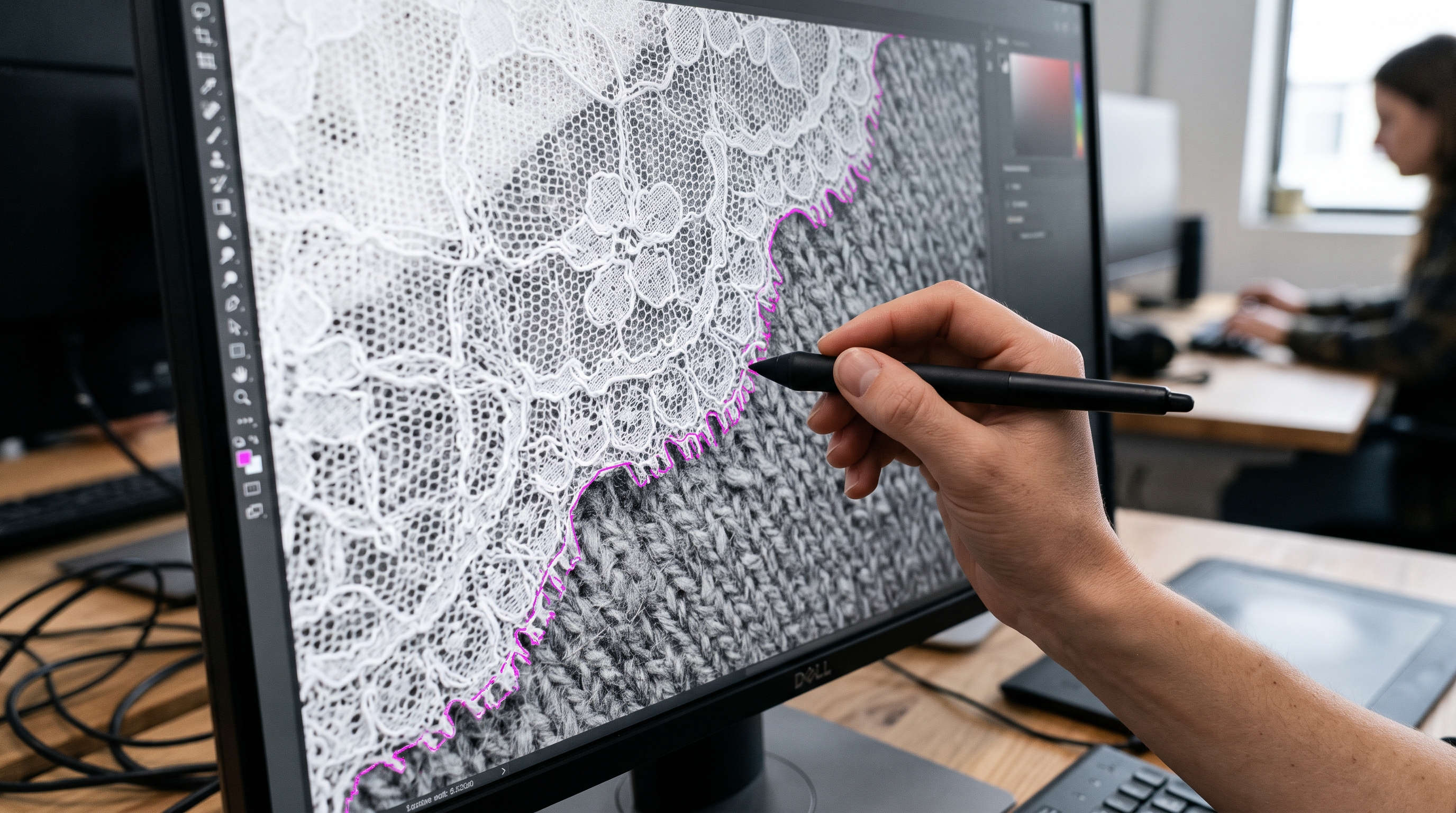
Traditional apparel post-production relies heavily on manual clipping paths and painstaking pen-tool masking in Photoshop. For lean studio teams managing seasonal drops of 5,000 to 20,000 items, manual editing creates an unsustainable backlog. Each photoshoot introduces slight variations in studio lighting, camera distance, and backdrop tone, forcing retouchers to spend hours adjusting masks per image.
Furthermore, manual workflows cannot keep pace with multichannel distribution requirements. A retail brand launching products across domestic e-commerce sites, wholesale partner portals, and global marketplaces often needs multiple background variations per SKU. Attempting to fulfill these multi-background demands manually triggers soaring contractor costs and missed go-live dates.
How do you maintain garment edge integrity during automated replacement?
The primary technical failure of primitive clipping algorithms is edge degradation. Fashion apparel features intricate textures—knitted wool fuzz, delicate lace borders, semi-transparent chiffon layers, and fine stray hairs on modeled shoots—that standard threshold-based removal tools routinely clip away or corrupt with harsh white halos.
Modern visual production engines utilize fabric-aware segmentation models trained specifically on apparel construction. Instead of treating an image as a generic pixel grid, these systems identify the garment's boundaries relative to skin tones and fabric drape. By recognizing stitch lines, fabric density, and semi-transparent gradients, automated background replacement retains micro-details such as open-weave knitwear and delicate tulle without manual intervention.
For a deeper dive into maintaining garment fidelity across variations, review Scaling AI Fashion Variations Without Changing the Garment.
Key evaluation criteria for background replacement software

Evaluating enterprise-grade background replacement software requires examining core operational capabilities rather than isolated graphic filters. Studio directors and PIM leads should prioritize systems offering robust batch ingestion APIs, predictable throughput, and seamless DAM connectivity.
| Feature | Manual Photoshop Editing | Automated Background Replacement |
|---|---|---|
| Throughput | 10–15 SKUs per artist per day | Thousands of SKUs per hour in batch |
| Edge Precision | Prone to human error and halo artifacts | Fabric-aware segmentation for lace & knits |
| Lighting Consistency | Varies by retoucher's subjective eye | Algorithmic normalization across sessions |
| Channel Adaptation | Requires manual resizing and masking per marketplace | Instant multi-format export and auto-padding |
To understand how streamlined pipelines fit into broader merchandising operations, see How to Build a Fashion Visual Supply Chain?.
Ensuring consistent lighting when swapping backgrounds
A common pitfall in bulk image editing is the mismatch between the foreground subject's original lighting and the new background environment. When a garment shot under warm tungsten studio lights is placed onto a cool white digital backdrop, the visual dissonance immediately signals a cheap cutout to discerning shoppers.
Effective background replacement engines dynamically analyze ambient light vectors from the original capture and recalibrate the background illumination to match. By calculating highlight dispersion on reflective fabrics and matching shadow density at the base of the product, the system ensures the final asset looks as though it was originally photographed in the target environment.
Maintaining color constancy across these lighting adjustments is critical; for further insights, explore Garment Color Consistency: How to Keep Product Images Accurate.
Standardizing apparel catalogs with automated workflows
Achieving uniform catalog presentation across seasonal collections requires replacing disparate photoshoot assets with standardized digital foundations. When every SKU in a 10,000-item catalog adheres to exact pixel dimensions, background hex codes, and shadow depth, site browsing velocity increases and bounce rates decline.
By integrating automated background processing directly into the visual asset pipeline, brands eliminate the human error inherent in repetitive editing tasks. Studio teams transition from manual quality control to high-level art direction, ensuring that every product page meets strict visual merchandising standards.
Explore related catalog production strategies in How to Achieve Fashion Catalog Image Consistency with AI.