

FlixStock Catalog Production — Centralized Multi-Channel Visual Asset
Catalog managers and operations teams managing high-volume fashion imagery frequently struggle with conflicting technical specifications, aspect ratios, and background requirements across channels like Amazon, Zalando, and Shopify. This guide explains how to build a centralized visual workflow that automatically adapts master assets for multi-channel compliance.
- Understanding why manual image reformatting creates severe launch bottlenecks.
- Defining a single master asset standard that feeds every sales channel.
- Automating technical specifications including aspect ratios, file sizes, and background rules.
- Maintaining rigorous brand consistency while complying with distinct marketplace guidelines.
Catalog operations and merchandising leads face an ongoing operational challenge: listing identical apparel across multiple sales channels requires navigating wildly conflicting technical image specifications. While Amazon mandates pure white backgrounds and square or 3:4 crops, European platforms like Zalando demand specific portrait aspect ratios (1:1.44), and D2C storefronts favor lifestyle framing. Manual reformatting through Photoshop creates severe launch bottlenecks, delays seasonal merchandising, and triggers high rates of image rejection from marketplace quality control teams.
Why manual image reformatting creates a bottleneck in your launch cycle
When launching thousands of SKUs across multiple regional marketplaces, relying on manual image editing teams or traditional reshoots slows time-to-market to a crawl. Each marketplace enforces strict quality control guidelines regarding aspect ratios, background purity, cropping boundaries, and color profiles. When product launch dates depend on manual asset preparation, operations teams inevitably face backlogs, missed promotional windows, and costly re-submissions.

Furthermore, manual editing often leads to inconsistent scaling across color variants. If a red blouse is cropped differently than its blue counterpart within the same SKU family, customer experience degrades, and automated platform audits flag the inconsistency. Automating the visual pipeline eliminates manual friction, ensuring every asset meets channel-specific criteria instantly upon ingestion.
How to define a master asset standard that serves all your sales channels
The foundation of scalable multi-channel merchandising is establishing a single high-resolution master asset standard. Instead of treating every channel as an isolated photoshoot requirement, brands capture or generate one pristine master product asset—such as an on-model hero shot or ghost mannequin capture from a tech pack or initial sample.
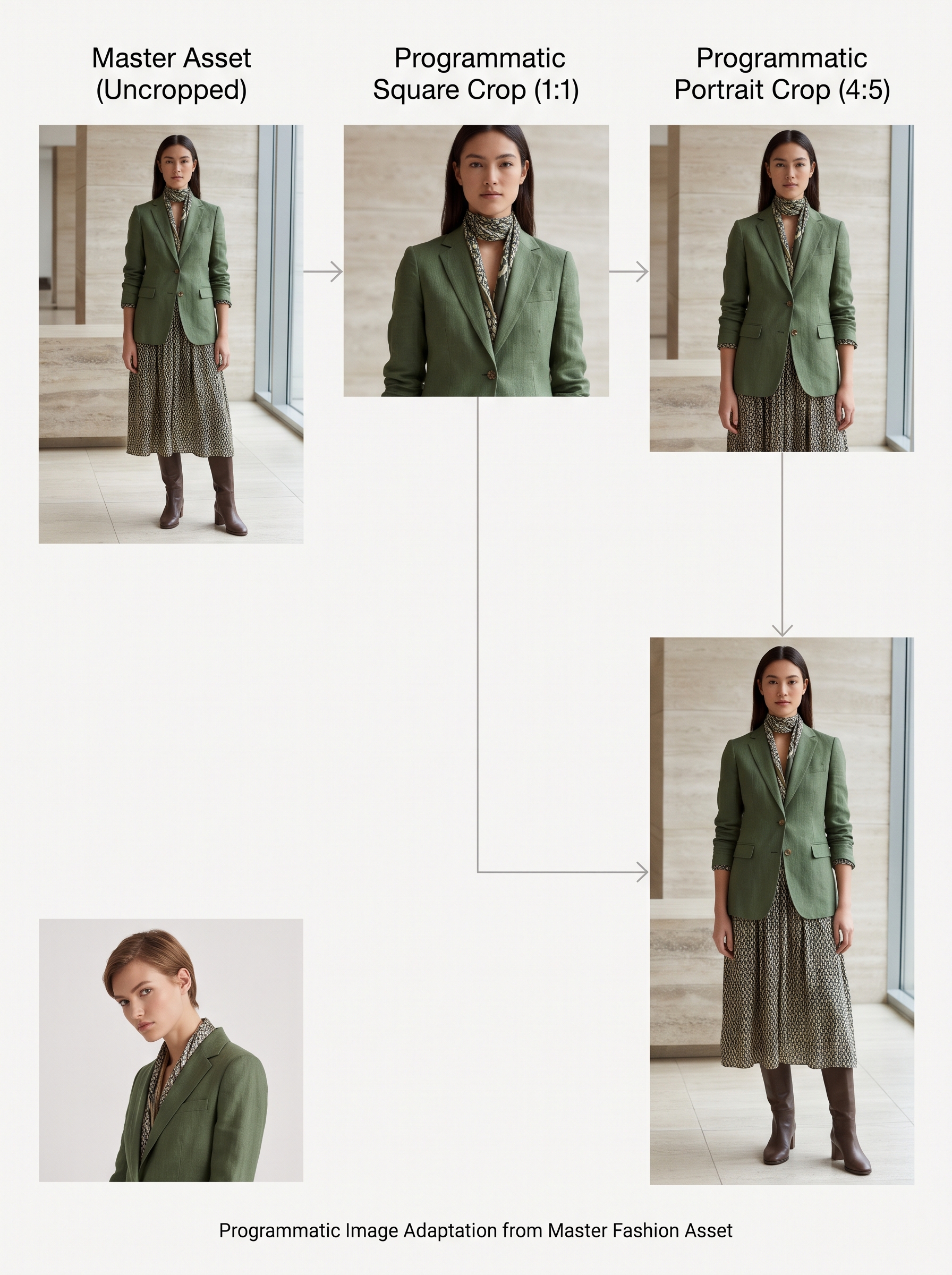
This master asset contains complete fidelity regarding garment texture, color accuracy, and draping behavior. By feeding this master file into an automated visual content engine, catalog managers can programmatically generate derivative assets tailored to Amazon, Zalando, Myntra, and Shopify without ever booking a secondary studio session or compromising the original garment representation.
What technical specifications (aspect ratios, file sizes, background rules) must be automated for marketplace compliance
Marketplace image compliance relies on strict adherence to technical parameters. Automating these variables prevents automated rejection bots from suppressing product listings:
- Aspect Ratio Harmonization: Instantly adjusting canvas dimensions from 1:1 square (Amazon) to 1:1.44 portrait (Zalando) or 4:5 (D2C social) while maintaining correct garment anchor points.
- Background Standardization: Automatically removing studio background noise, drop shadows, or floor seams to enforce pure white (#FFFFFF) for marketplace compliance or neutral off-white for European channels.
- File Size & Compression Optimization: Compressing high-resolution masters into web-optimized JPEG or WebP formats that load rapidly on mobile devices without sacrificing textile clarity.
- Color Profile Verification: Enforcing sRGB color space conversion to ensure fabric hues remain identical across desktop and mobile screens.
Automating these technical rules ensures 100% first-time pass rates across marketplace quality assurance gates.
How to maintain brand consistency while meeting platform-specific guidelines
Juggling disparate platform guidelines often causes brands to lose their visual identity. For instance, rigid white background rules can make a luxury silk dress look sterile if lighting and styling are not carefully managed. Maintaining brand consistency requires enforcing unified lighting geometry, model pose standards, and color grading across all adapted derivatives.

When visual content engines process apparel assets, they preserve garment drape, fabric texture, and structural details regardless of the target canvas size or background color. This ensures that whether a shopper views your collection on Amazon, Zalando, or your proprietary D2C storefront, the brand experience remains cohesive, premium, and instantly recognizable.
| Sales Channel | Target Aspect Ratio | Background Requirement | Compliance Focus |
|---|---|---|---|
| Amazon Fashion | 1:1 (Square) or 3:4 | Pure White (#FFFFFF) | Strict background purity & clear front view |
| Zalando | 1:1.44 (Portrait) | Neutral Light Grey / Off-White | Exact portrait ratio & full-length model framing |
| Shopify / D2C | Flexible / 4:5 or 1:1 | Brand-Aligned / Lifestyle | Editorial storytelling & rich detail shots |